The Best & Affordable Culling Software for Photographers in 2026: Narrative Select
I've Used the Big Culling Programs. Here's the One I'd Recommend in 2026.
Culling is one of the most boring parts of the photography process. Well, at least for me. You come home from a session with thousands of images, and before you can edit a single one, you have to sit down and decide which ones are worth keeping. If you're anything like me, that's the part of the workflow you put off the longest, especially when your computer isn't brand new and every image takes time to load. So if you're searching for the best culling software for photographers in 2026, and you want something that won't drain your bank account every month, my pick is Narrative Select. If you've been put off by the heavy AI-forward marketing from companies like Aftershoot and Imagen, Narrative is a refreshing middle ground that gives you the speed of a modern culling tool while keeping you in charge of every image that makes it into your gallery.
In this post, I'm walking you through my own history with culling software, what I'd tell any photographer to look for in a culling program this year, how Narrative compares to Aftershoot, Imagen, and Capture One, and what you'll actually pay for each one.
My Culling Software History: Why I switched from Aftershoot to Narrative
I started using Narrative Select back in 2021, and it was the very first culling program I ever used. Before Narrative, I would cull images in Lightroom. I've actually been a Narrative user even longer than that, since I started using their blogging software back in 2019.
Aftershoot reached out to me in 2023, and I tested their software privately for a year before I ever recommended it to my community. I officially partnered with them in 2024 and used Aftershoot until this past summer, 2026. I don't put my name behind a product lightly, so I want to be clear that Aftershoot is capable software, and I got a lot out of the time I spent using it.
So why did I come back to Narrative? I didn’t like the extreme AI direction Aftershoot has been heading in. Aftershoot's culling and editing were great, but once they launched retouching, which felt pretty rough in my opinion, I noticed a pattern of new features coming out quickly without the same level of quality I'd come to expect. Instead of being great at a few things, it started to feel like they were trying to do everything, and in my opinion that turned them into a master of none. If you want the whole story of my switch, I go into all of it in this blog post.
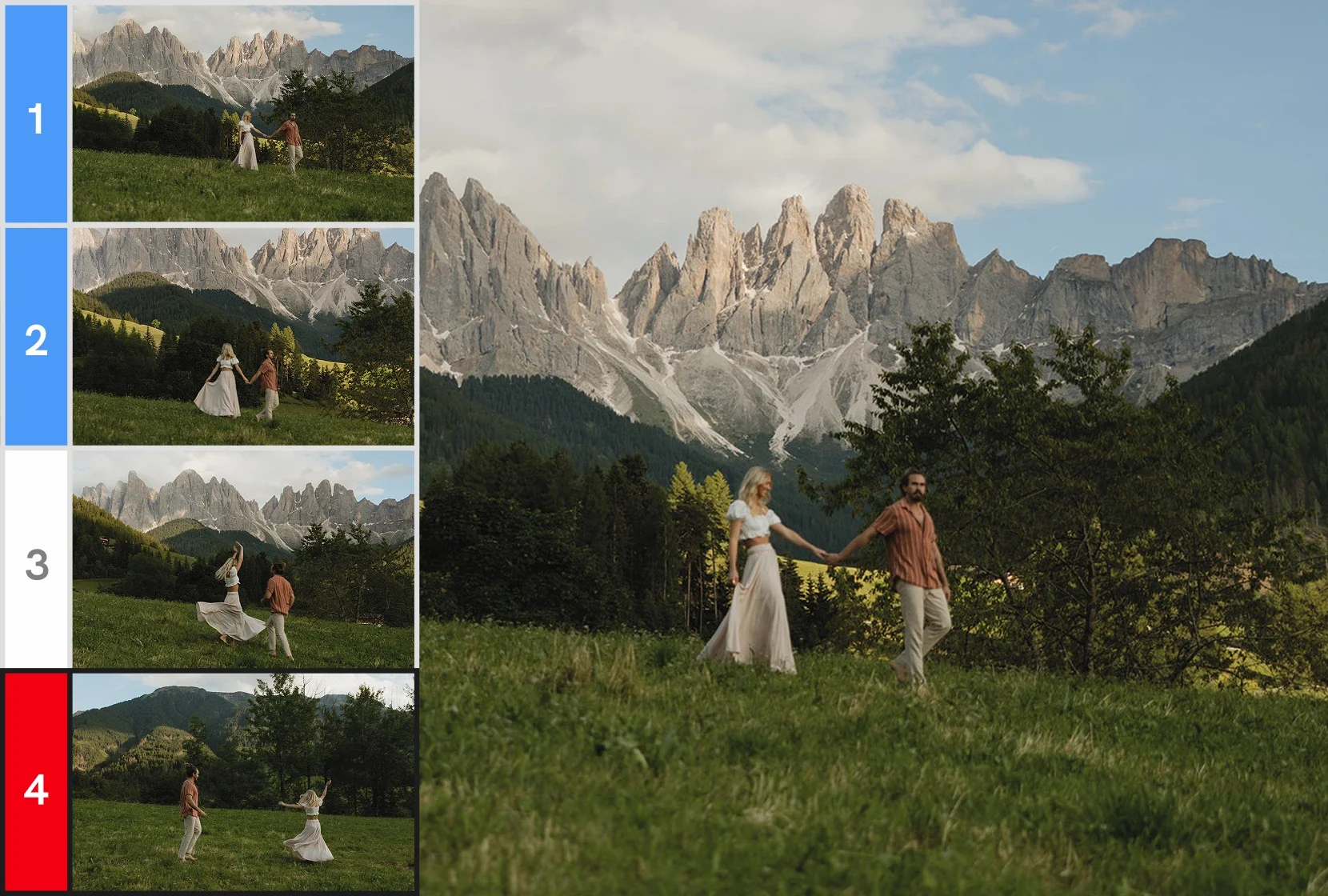
Narrative Select Culling

Aftershoot Culling
What Culling Software Is and Why It's Worth Paying For
If you're newer to photography, culling is the process of going through every image from a session and choosing which ones you'll keep, edit, and deliver to your client, and which ones get left behind. Every photographer does it, whether you're working through a 200-image headshot session or a 6,000-image wedding.
You can technically cull inside Lightroom, and a lot of us did for years. The problem is that Lightroom was built for editing, so when you try to move quickly through hundreds of images, you end up waiting on each one to load clearly enough to tell whether it's sharp, and zooming in on faces one at a time to check for blinks. A dedicated culling program is built for this one job, so your images load almost instantly, and you get tools that help you make decisions faster. When you add up the hours that saves you over a busy season, it's one of the easiest software subscriptions to justify in your photography business.
How to Choose the Right Culling Software for Your Photography Business in 2026
Having switched culling software more than once, I've learned which features make a real day-to-day difference, so here's what I'd tell any photographer to look for before signing up for anything.
Price: Culling software is a recurring cost, so look at what you'll pay every month or year for the features you'll actually use, rather than the lowest number on the pricing page.
Speed on an older computer: Not everyone is working on the newest laptop. I'm on a 2020 MacBook Pro, so I need software that loads my RAW files quickly without making my computer struggle.
Learning curve: The best culling program in the world won't save you any time if you never get past the setup. You want something you can open and use the same day.
Local to your computer, not hosted on the cloud: I want my images living on my own computer and my own drives, and I want to be able to cull with no internet connection at all, whether I'm at home, on a plane, or traveling for a photoshoot.
How it hands your picks off to Lightroom: Once you've made your selections, getting them into your editing program should take a click, not a whole process.
How much control you keep over your selections: Some programs choose your images for you and have you check their work, while others leave every decision to you. Know which one you want before you commit.
The Culling Spectrum: Who's Making the Picks?
The easiest way I've found to explain the differences between the big culling programs is to think of them on a spectrum based on one question: who is actually making the picks?
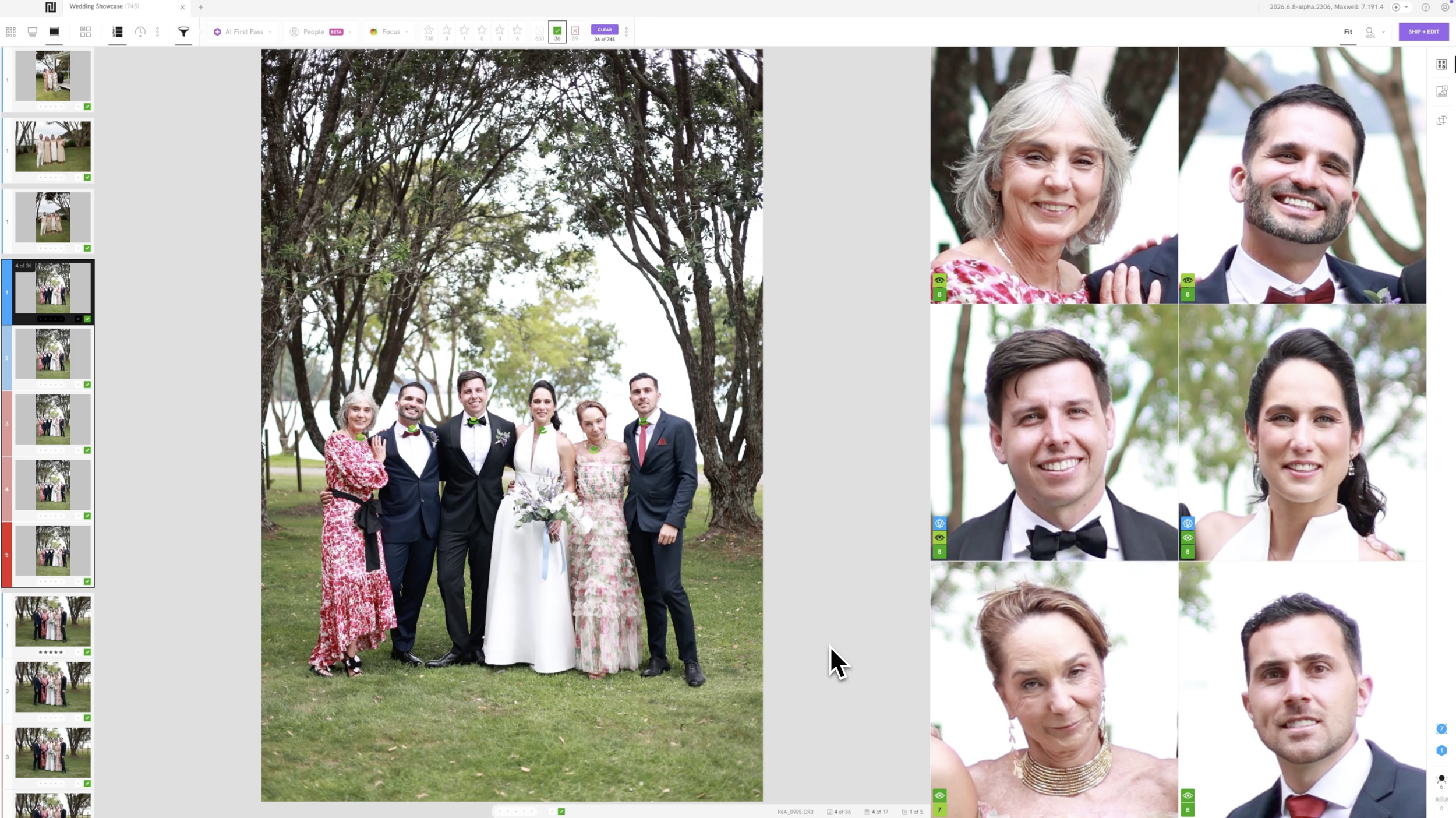
On one end, you have programs like Aftershoot and Imagen, where the AI goes through your gallery and chooses your images for you, and then you go in yourself to check its work. On the other end, you have Capture One, where you do every bit of the work yourself with fairly basic tools to help you. Narrative lands right in the middle. You're the one making every decision, but you have helpful information right alongside you while you do it, like focus scores that tell you how sharp an image is and eye assessments that flag whether someone's eyes are open or closed.
For me, the middle is the sweet spot. I get the speed of a modern culling program without handing the creative decisions over to software, and I still know that every image in my gallery is there because I chose it.
Why Narrative Select Is My Pick
Going back to the list above, here's how Narrative stacks up for me.
Price: Narrative is the most affordable option I'd recommend, starting at $10 a month for culling only. I break the pricing down fully in the next section.
Speed on an older computer: Narrative imports RAW files in a few seconds, and there's no waiting on images to load clearly or sitting through pixelated previews while you scroll, even on my older laptop.
Learning curve: You download it, import your images, and you're culling within minutes. I'm someone who struggles with new technology more than most, so when I say the learning curve is basically nonexistent, I mean it.
Local and offline: Narrative runs on your own computer, so your images never have to be uploaded anywhere, and you can cull without an internet connection.
Lightroom handoff: When I'm done, I ship my selections straight into Lightroom. Narrative can also ship to Photoshop and Capture One if that's where you edit.
Control: Every pick is mine. The AI gives me information as I go, but it never makes a decision for me.
My actual workflow is about as simple as it gets. I work in Scenes View, which groups together images taken in the same moment so I can compare them side by side, and I tag the images I want to keep with the T key as I go. When I'm through the gallery, I go back through my tags and untag anything I've changed my mind on with the U key. That's it. Using exactly this method, I culled an entire 10,000-image wedding gallery in about two hours, looking at every single image myself.
The Affordability Breakdown
Let's talk about what you'll actually pay, since this is where a lot of photographers get tripped up.
Narrative's Lite plan is $10 a month billed annually, or $15 billed monthly. It covers culling only, with unlimited images and projects, focus scores, a face zoom feature for checking sharpness, and shipping to Lightroom, Photoshop, or Capture One. If you're photographing four sessions a month, that works out to $2.50 per gallery.
One thing I want to be upfront about: Scenes View and the Close-Ups Panel, the two features I use the most, are part of Narrative's Standard plan, which is $20 a month billed annually or $29 monthly. If you're photographing weddings or larger sessions, that's the plan I'd point you toward. Even at that level, four sessions a month works out to about $5 per gallery.
Imagen's culling is $12 a month billed annually or $18 monthly, with unlimited culling. The catch is that you can't buy it on its own the way you can with Narrative. Imagen's culling is sold as an add-on to one of their editing plans, so it's built to be one piece of their larger system.
Aftershoot's culling-only plan is $10 a month billed annually, or $15 billed monthly, which is the exact same price as Narrative's Lite plan. So if you're only comparing culling, price isn't what separates these two. The real difference is in how you cull and who's making the picks, which I get into further down.
Capture One Pro runs about $18 a month on an annual plan after a price increase this summer. That gets you a full editing program with some basic culling tools built in, so if you're only after culling, you're paying for a lot of software you may never touch.
| Program | Starting price | Where it runs | Who makes the picks |
|---|---|---|---|
| Narrative | $10/mo (billed annually) | Your computer, works offline | You, with helpful information |
| Aftershoot culling | $10/mo (billed annually) | Your computer, works offline | The AI, then you review |
| Imagen culling | $12/mo (billed annually), add-on to an editing plan | The cloud | The AI, then you review |
| Capture One Pro | About $18/mo (billed annually) | Your computer | You, with basic tools |
One more thing worth knowing for 2026: Narrative retired its old free plan in 2025, so the free trial is now the way to test it out. With my link, you get 14 days free, no credit card required, which is plenty of time to cull a couple of real galleries and see how it feels.
How Narrative Compares to the Other Big Names

Aftershoot and Imagen
I'm grouping these two together because they have a lot in common. Both have the AI go through your gallery and choose your images for you, and then you review what it picked. Imagen even has a feature where you tell it exactly how many images you want, and it chooses that many for you. Both companies also lean hard into AI as the main point of their marketing, which I've talked about a lot because I don’t like that. And both are built to keep you inside their own all-in-one system, where culling is just the first step of a bigger workflow they want you to run entirely through them. Aftershoot now offers editing, retouching, and client galleries on top of culling, and Imagen pairs its culling with editing, retouching tools, and cloud storage, so the goal for both is to have you do almost everything inside their software.
If you're specifically deciding between Narrative and Aftershoot, I've written a full side-by-side comparison that goes into pricing, import speed, and how each one handles a big wedding gallery.
Imagen and the Cloud
I used Imagen’s AI editing back in June 2023, before I ever started using Aftershoot. At the time, Aftershoot didn’t even have editing yet, only culling, and Imagen only offered editing, which is why I’ve never used their culling. I really liked Imagen’s editing, and looking back, it was probably the most accurate AI editing I’ve used out of the three, because I hardly had to make any tweaks compared to Narrative and Aftershoot. Now, though, I don’t love that their editing is priced per image unless you jump up to their $179-a-month unlimited plan, which just isn’t economical for me. Since I’ve never used their culling, everything I’m sharing about it comes from how it’s set up and priced rather than hands-on experience.
The biggest difference between Imagen and Narrative is that Imagen’s culling is cloud-based and Narrative is not. With Imagen, instead of culling on your own computer, you upload your gallery to Imagen’s servers, and the culling happens there. To be fair, that does mean it doesn’t use your computer’s processing power, which some photographers will like. But it also means you need a strong internet connection every single time you cull, and you’ll be waiting on uploads, which adds up fast when you’re working with a full wedding gallery.
It also means your clients’ images are living on someone else’s servers. That bothers a lot of photographers, and for some it can be a major turn-off, especially if you photograph boudoir, private family sessions, or clients who are particular about where their images go. Narrative, on the other hand, runs locally on your own computer, loads your images in seconds, and works without an internet connection. Narrative and Aftershoot both get major points for keeping culling completely off the cloud.
Capture One
Capture One is a full editing program that a lot of photographers love, especially in studio and commercial work, and it does have culling tools built in. In terms of approach, it's actually the closest to Narrative, because you're the one ranking every image yourself.
The difference is how much help you get. Capture One has a feature called Face Focus, which zooms in on the faces in your image so you can check sharpness yourself. But nothing scores your focus, flags closed eyes, or suggests which frame in a burst is the strongest, so every decision is fully manual with very little assistance. It's also a big program to open just to pick photos, especially if you're working on an older laptop. If you love editing in Capture One, you can absolutely cull in Narrative and ship your picks straight into Capture One when you're done.

How to Get Started in Your First Week
If you want to give Narrative a real test run, here's what I'd do. Download the 14-day free trial and import a gallery from a recent session, ideally one you already culled another way, so you have something to compare against. Work through it in Scenes View, tagging the images you want to keep, then go back through your tags and untag anything you've changed your mind on. When you're done, ship your picks straight into Lightroom and pay attention to how long the whole process took you. One real gallery will tell you more than any comparison chart ever could.
Frequently Asked Questions
Is there free culling software in 2026? You can cull inside Lightroom, which you may already be paying for, but it isn't built for speed. Narrative no longer has a free plan, but you can try it free for 14 days with my link, no credit card required.
Is Imagen or Narrative cheaper for culling? Narrative's Lite plan starts at $10 a month billed annually, while Imagen's culling starts at $12 a month billed annually and is sold as an add-on to one of their editing plans. Narrative is also the only one of the two you can buy as culling only.
Can I cull in Capture One instead? You can, and Capture One's Face Focus feature helps you check sharpness on faces. It's a manual process, though, with no focus scores or eye assessments to help you along the way.
Does culling software work without internet? It depends on the program. Narrative runs locally on your computer and works offline. Imagen's culling is cloud-based, so you need an internet connection to upload your images and cull them.
Is Narrative good for beginners? Yes. It's one of the easiest culling programs to learn, and most photographers are culling within minutes of downloading it.
Ready to Try Narrative?
If you've made it this far, here's where I land. For most photographers in 2026, especially if you want something affordable, quick to learn, local to your own computer, and built around you making the creative calls, Narrative is the culling software I'd recommend. Sign up using the link below to get 14 days free, no credit card required, and if you end up loving it as much as I do, use code jessicawhitaker for 10% off.